Blog & guides
How do you apply a tempered glass screen protector correctly?
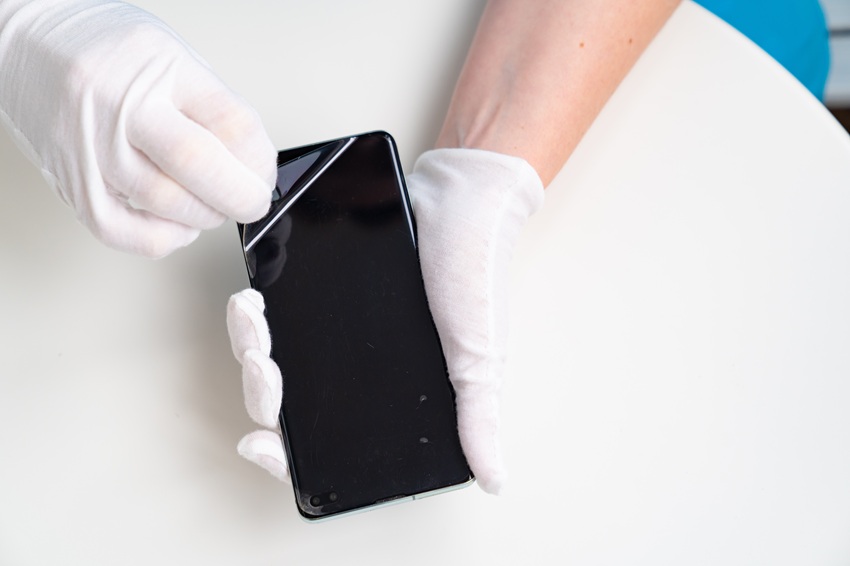
You apply tempered glass correctly by cleaning the screen thoroughly, removing all dust, positioning the glass precisely and pressing it on from the middle out towards the edges. Do it in a clean, dust-free room and take your time. Most air bubbles are caused by dust or grease on the screen, not by the glass itself.
What does it cost?
You always get a fixed price before we start. See the price for your exact model in the price finder.
Fixed price before we startNo payment online
Below you’ll find a step-by-step guide, typical mistakes and what to do if the result isn’t good.
Why tempered glass is a good idea
Tempered glass is a thin layer of hardened glass that sits on top of your screen. It takes the scratches and some of the impact if the phone is dropped. A cracked screen protector is cheap to replace – a smashed screen isn’t. The glass doesn’t protect against everything, though: a hard fall on a corner can still damage the screen.
What you’ll need
- A tempered glass screen protector that fits your exact phone model
- The alcohol wipe, microfibre cloth and dust-removal sticker that usually come with it
- An alignment frame, if the glass comes with one
- A clean table in a room with as little dust as possible – many people use the bathroom after a hot shower, because the steam binds the dust
How to apply tempered glass – step by step
1. Clean the screen thoroughly
Wipe the screen with the alcohol wipe so grease and fingerprints disappear. Dry it with the microfibre cloth until the screen is completely dry and streak-free.
2. Remove the last of the dust
Use the dust-removal sticker to lift off the tiny specks of dust the cloth didn’t catch. Hold the screen up to the light and check that it’s completely clean.
3. Position the glass
Peel the protective film off the glass without touching the adhesive side. Hold the glass by the edges and line it up with the camera, speaker and buttons – or use the alignment frame.
4. Press from the middle out
Lay the glass down and press lightly in the middle. The adhesive spreads out by itself. Then smooth it with the cloth from the middle towards the edges, so the air is pushed out.
5. Check the result
Small bubbles without dust often disappear by themselves within a day or two. If there’s a speck of dust under the glass, you can carefully lift the corner with a strip of tape, remove the dust with the dust-removal sticker and lay the glass back down.
Typical mistakes when applying tempered glass
- The glass is crooked: Lift it quickly, before the adhesive fully sets.
- Bubbles along the edge: Often a sign that the glass doesn’t fit the model exactly, or that a case is pressing on the edge.
- The screen responds poorly: Check that the glass is made for your model. A glass that’s too thick or the wrong one can affect touch sensitivity.
Is the screen already cracked?
Tempered glass doesn’t hide a damaged screen. If the screen itself is cracked, or it doesn’t respond to touch, it should be replaced. Read more about screen replacement, and see how else you can protect your phone in how to protect your smartphone from damage.
Frequently asked questions
Why are there bubbles under my tempered glass?
Almost always because of dust or grease on the screen. Small bubbles without dust often disappear by themselves within a day or two. Bubbles with a speck of dust in the middle won’t go away – here the glass has to be lifted and the dust removed.
Can I reuse a tempered glass protector I’ve taken off?
It’s possible if the glass is intact and the adhesive is clean, but it rarely sits as well the second time. If the glass is cracked, it needs replacing.
Does tempered glass stop the screen from breaking?
It reduces the risk of scratches and cracks, but it’s no guarantee. A hard fall, especially on a corner, can still damage the screen. A case with a raised edge gives extra protection.
What do I do if the screen under the glass is cracked?
Then the screen itself needs replacing. See the prices on our prices page, or drop in at one of our shops in Odense and Nyborg. You get the price before we start.
If your screen has been damaged, you can book a time online or drop in at ITech-Rep on Hunderupvej or Nørregade in Odense, or on Nørregade in Nyborg. Find the addresses under shops.
Related repairs
Need help?
We repair in our own workshop in Odense and Nyborg
See the price of your repair, or call – you’ll talk to a technician.